The motion control feature (new in v0.35.0) is intended to allow the user to use a trajectory generator paired with the simulator in order to simulate trajectories that are dynamically generated by an external source.
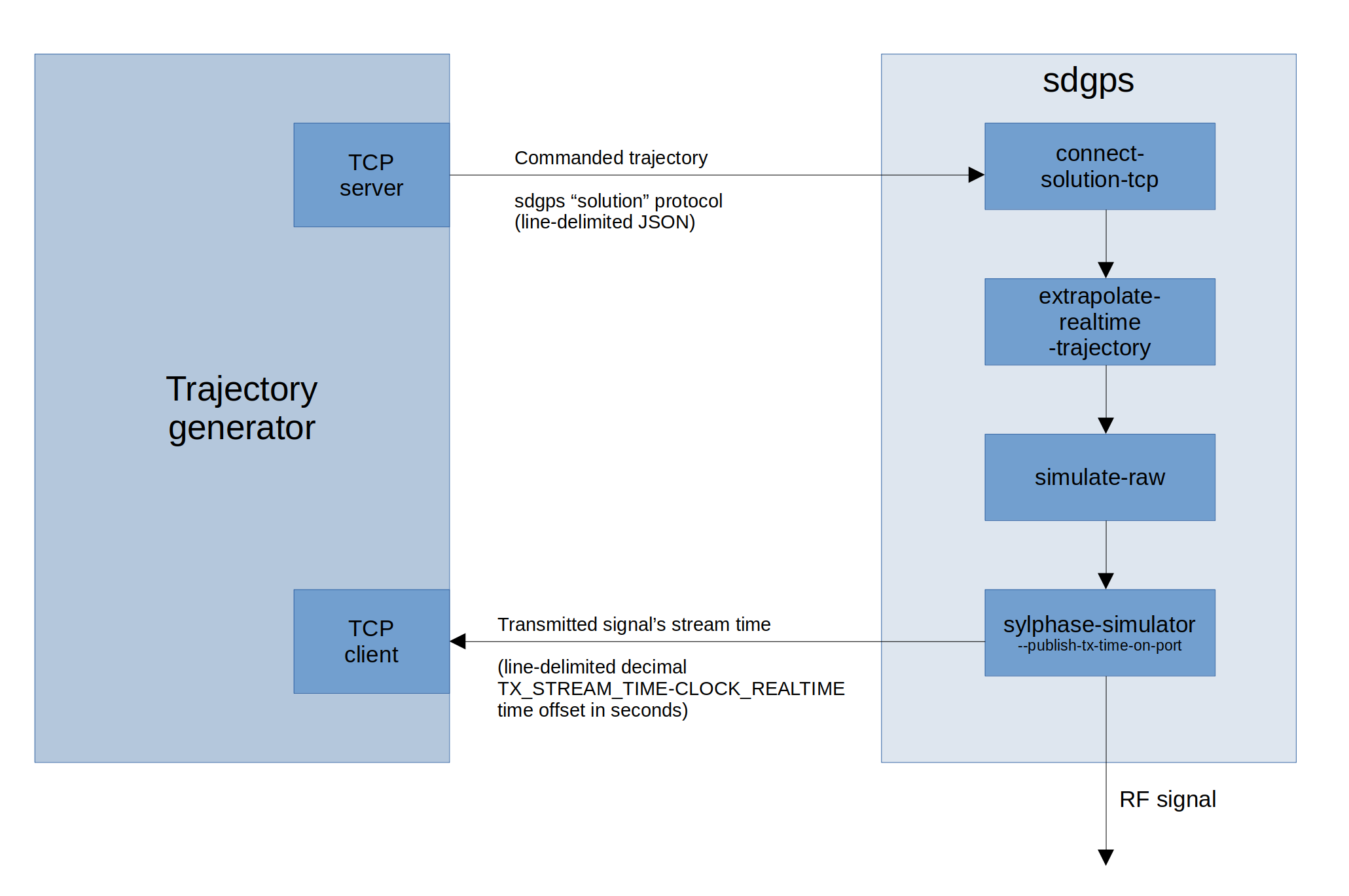
Motion control utilizes the following feature sets:
- Time stream:
- New: The
TX_STREAM_TIME - CLOCK_REALTIME time stream which is provided by the sylphase-simulator node:
TX_STREAM_TIME is the "current" stream time being transmitted on the RF signal.
CLOCK_REALTIME is the "current" CLOCK_REALTIME on the simulator.
- The difference between the two values a very slowly drifting offset that is almost constant, but not precisely (due to to clock drift between the simulator's OCXO and the host's system clock).
- When being transmitted over TCP via the
sylphase-simulator --publish-tx-time-on-port PORT option, it is transmitted as a line-delimited decimal.
- The units are seconds.
- Interface:
- The solution interface, which conveys a point along a trajectory.
- Nodes:
- The connect-solution-tcp node is used to create a TCP client that will stream solution packets from the trajectory generator to the simulator, which will then be used to update the simulator RF signal.
- New: The extrapolate-realtime-trajectory acts as a buffer between solution sources. It allows the simulator to extrapolate forward the solution trajectory beyond what is available to enable continuous operation of the simulator. It uses a cubic spline to interpolate between provided solution packets.
- The simulate-raw node is used to generate raw I+Q samples that the
sylphase-simulator will consume and use to produce RF signals on the simulator hardware.
- The sylphase-simulator node has a new option called
--publish-tx-time-on-port. This option is used to create a TCP server on the specified port and publish the TX_STREAM_TIME - CLOCK_REALTIME time stream so that the TCP clients that connect can utilize the offset between the simulation stream time and realtime.